Wildcards in ServiceNow: The Small Search Trick That Saves You Big Time
If you’ve been using ServiceNow for even a short while, you already know how quickly the data grows. Incidents, catalog requests, users, CIs, change records — everything keeps stacking up. And somewhere in that never-ending pile, you’re always searching for something: a ticket you vaguely remember, a user’s name you’re not fully sure of, a CI with a strange prefix, or a description that had a certain word… somewhere.
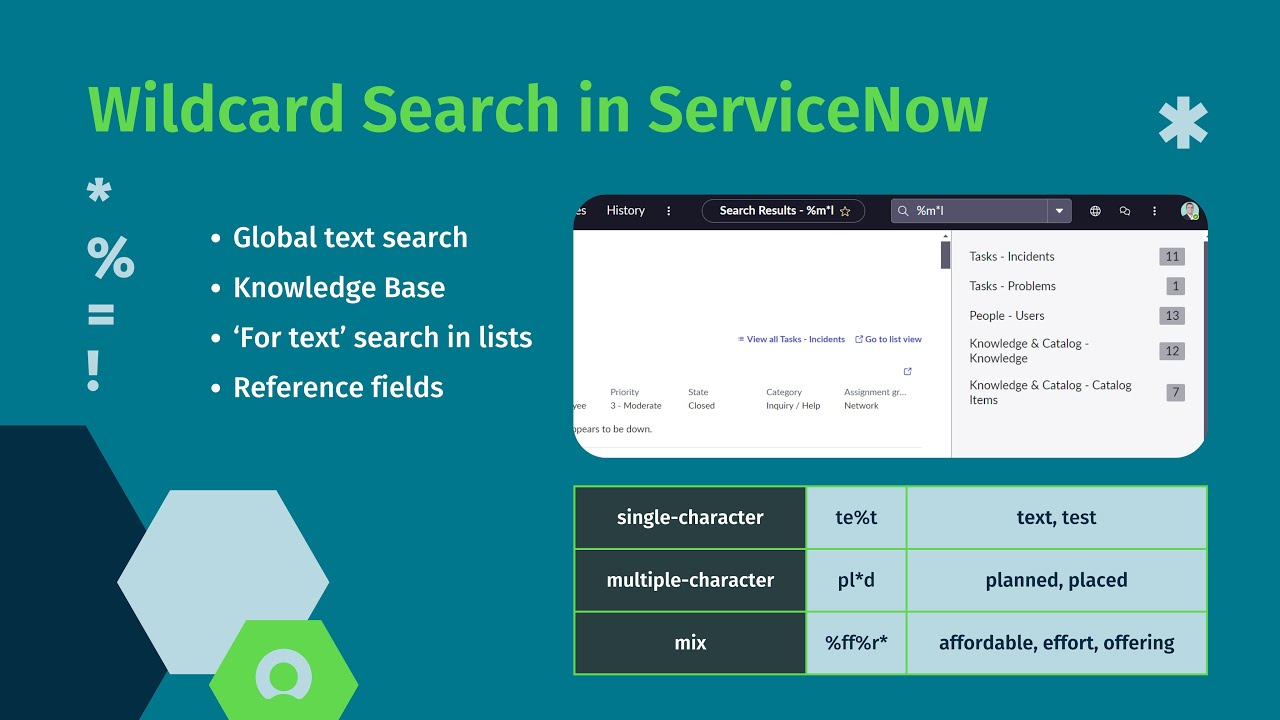
ServiceNow gives you great filtering tools, but there’s one tiny feature most people overlook — wildcards.
They don’t stand out. They’re not a highlighted button or a flashy option. But they quietly save you minutes (and sometimes frustration) every single day.
This post breaks down wildcards in a simple, natural way: what they are, where to use them, and why they genuinely make your daily work smoother.
What Exactly Is a Wildcard in ServiceNow?
A wildcard is basically a shortcut for telling ServiceNow:
“Show me anything that even slightly matches what I’m typing.”
The main wildcard you’ll use is:
- The asterisk (*)
Whenever you don’t remember the complete text — or you’re unsure about spelling — the asterisk fills in the gaps. ServiceNow then takes your partial input and tries to match it with anything similar.
It’s simple, tiny, and surprisingly powerful.
Why Wildcards Matter More Than You Realize
Most of the time, we don’t search for exact wording. Real life doesn’t work that way.
Maybe you remember:
- half a caller’s name
- part of a CI label
- a few letters from a ticket number
- a keyword hidden somewhere in a long description
Wildcards help you with all of these. They allow you to:
- Find results faster
- Avoid endless scrolling
- Build smarter filters
- Troubleshoot without digging
- Work even when your memory isn’t perfect
They make ServiceNow feel less strict and a lot more user-friendly.
How the Asterisk (*) Works
The asterisk means:
Match any number of characters — even zero.
Examples:
- Mar* → anything that begins with “Mar.”
- *error → anything ending with “error.”
- *config* → anything containing “config” anywhere
- M*r → starts with M, ends with r, and has anything in between
One symbol covers every spelling variation you can imagine.
Where Wildcards Work Inside ServiceNow
Wildcards work almost everywhere you type text:
- list filters
- form searches
- global search
- related lists
- condition builders
- reports
- GlideRecord scripting (using % instead of *)
- Flow Designer lookups
- reference field searches
Once you get used to them, searching without wildcards starts to feel slow.
Examples You’ll Use Every Day
- Searching for Users When YouDon’tKnow the Spelling
If you’re unsure whether Catherine starts with a C or a K:
- Search: *ath*
You might get:
- Kathrine
- Catherine
- Kathryn
- Athiya
One wildcard removes the guesswork.
- Finding IncidentsWithCertain Keywords
Search: *auth*
This will pick up:
- “authentication failed”
- “user not authorized”
- “re-authentication required”
The position of the word doesn’t matter.
- Finding CIs With Unpredictable Naming Styles
Search: *linux*
Matches might include:
- Linux-app-01
- Linux server – PROD
- Linux_db_cluster
A single wildcard handles all variations.
- Remember Just the Ending of a Ticket Number?
Search: *482
Results might include:
- INC001482
- CTASK78482
- RITM024482
A huge help when you deal with thousand-ticket days.
Using Wildcards in List Filters
Examples:
- Short Description → contains → timeout*
- Assigned to → starts with → Mar*
- Location → contains → office
They also work with operators like:
- includes
- does not include
- begins with
- ends with
Using Wildcards in Reports
Wildcard logic helps in flexible reporting:
- All incidents containing “database” → *database*
- All Finance app CIs → fin*
- All catalog items with “access” → *access*
A single wildcard condition often replaces multiple rules.
Wildcards for Developers (GlideRecord)
In scripts, you use LIKE with %:
var gr = new GlideRecord(‘incident’);
gr.addQuery(‘short_description’, ‘LIKE’, ‘%error%’);
gr.query();
Works the same way wildcards do in UI searches.
Common Mistakes People Make
- Adding spaces
- Wrong: * error *
- Right: *error*
- Thinking * matches one character
- It actually matches many.
- Using too many wildcards
- The server might return thousands of records.
- Forgetting they work outside list filters
- They work almost everywhere.
Why You Should Get Comfortable With Wildcards
They help you:
- search faster
- reduce guesswork
- build flexible filters
- troubleshoot issues quickly
- work more confidently
- clean up reporting
And the best part?
- No special permissions
- No extra roles
- No scripting knowledge
Final Thoughts
In a platform full of massive tables and rapidly growing data, wildcards are a tiny but powerful tool. They make ServiceNow easier to navigate, less overwhelming, and far more forgiving when you don’t remember exact details.
Start using them more often — you’ll immediately feel the difference.
And once you get comfortable with wildcards, ServiceNow starts to feel smoother, faster, and much more intuitive.


