XML in ServiceNow: The Quiet Structure That Holds Everything Together
When people talk about ServiceNow, the focus almost always goes to the eye-catching parts—the automation that cleans up messy processes, the catalog items that behave like guided forms, or the CMDB maps that lay out entire infrastructures like blueprints.
Those pieces get the spotlight because they’re easy to notice. But underneath all that polish sits a layer most users rarely think about.
It doesn’t show up on dashboards, and you never “click” it directly, yet almost everything you build or move inside the platform depends on it in some way.
That hidden foundation is XML.
If you’ve ever exported a record, moved update sets, compared configurations, or transported a change from one instance to another, you’ve already dealt with XML—often without realizing how much work it handled. It’s the quiet middleman that shapes, carries, and reconstructs data exactly the way it was created.
This article breaks down how XML actually works inside ServiceNow, why it matters so much, and why it’s still irreplaceable even as the platform grows more modern each year.
What XML Really Is (Explained Simply)
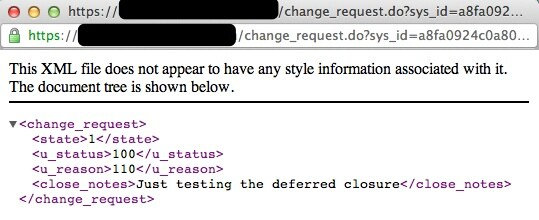
- XML—short for Extensible Markup Language—isn’t a programming language and doesn’t perform logic.
- Its job is simple: organize data in a clean, predictable structure.
Picture a stack of files where every sheet has a label telling you what the information means. XML does the same thing using tags.
A tiny example:
<incident>
<short_description>Cannot log in</short_description>
<priority>2</priority>
</incident>
This kind of structure appears whenever ServiceNow exports a record, stores an update, or moves configuration data between environments. It keeps everything labeled and readable so nothing gets lost during the journey.
Why XML Is Still So Important Inside ServiceNow
- It moves configurations from one instance to another
- scripts
- dictionary entries
- business rules
- UI components
- catalog items
- It protects complex structures
- nested variables
- templates
- UI pages
- flows
- child records
- Update sets depend completely on XML
- every captured change is stored as XML
- preview, commit, and merge rely on XML
- It connects old systems with new ones
- supports SOAP-based tools
- ensures compatibility with legacy systems
Where You See XML Every Day (Usually Without Noticing)
- Exporting records
- Importing XML files
- Handling update sets
- SOAP integrations
- Migration and configuration transport
How a Record Looks When Exported as XML
<record_update>
<sys_updated_by>admin</sys_updated_by>
<sys_created_on>2024-01-10</sys_created_on>
<short_description>Login Issue</short_description>
<priority>3</priority>
</record_update>
- Every field becomes a tag.
- Every tag holds exactly one value.
What Happens When You Import an XML File
- It checks whether thesys_idexists
- If yes → updates the record
- If no → creates a new one
- It restores all fields exactly
- timestamps
- system fields
- metadata
How Admins Use XML in Real Scenarios
- Moving catalog items safely
- Backing up scripts
- Fixing missed update-set captures
- Restoring damaged or missing records
- Sharing configurations internally
How Developers Make Use of XML
- Comparing scripts using XML exports
- Reviewing complex structures
- Supporting XML-based integrations
- Generating bulk XML for multiple records
XML vs JSON in ServiceNow
| Feature | XML | JSON |
| Structure | Verbose, descriptive | Clean, compact |
| SOAP Compatibility | Required | Not used |
| Record Exporting | Fully supported | Not supported |
| Update Sets | Core format | Not applicable |
| Handling Complex Configurations | Very strong | Moderate |
Mistakes to Avoid When Using XML
- Importing files with conflicting sys_ids
- Editing XML incorrectly
- Importing directly in production
- Forgetting XML contains system fields
Why XML Isn’t Going Anywhere in ServiceNow
- update sets
- migrations
- SOAP messaging
- configuration backups
- record transport
XML is deeply tied into how ServiceNow stores and transfers configuration.
Final Thoughts
XML rarely gets attention, and it certainly doesn’t look impressive at first glance. But once you understand how much of ServiceNow’s structure depends on it, its value becomes obvious. It keeps data organized, moves configurations safely, and prevents admins from rebuilding things from scratch.
It may not be flashy, but XML is one of the most dependable tools inside ServiceNow—and the platform wouldn’t function the same way without it.


