
Alert Management Rules in ServiceNow – Turning Noise into Meaningful Action
You probably already know the pain. If you’ve ever been in an IT Operations role, you know the pain of working with a monitoring system – lots of noise.
- Servers up and down
- Memory spikes
- Disks full
- Application response times slow
Before you know it, the monitoring system is blowing up with alerts every few seconds. Suddenly, the entire operations team is trying to sift through hundreds of alerts, trying to determine what’s truly important.
That’s where Alert Management Rules in ServiceNow enter the picture.
They don’t just organize the noise – they define how the entire organization reacts to technical noise. If set up correctly, alert rules eliminate noise, speed up response times, and prevent the entire team from getting bogged down in unnecessary noise. If set up incorrectly? More noise.
Let’s define what alert management rules are, how they work, and why we think they are one of the most important and least understood pieces of the entire IT Operations Management in ServiceNow puzzle.
First, What Is Alert Management in ServiceNow?
In ServiceNow’s IT Operations Management (ITOM), alerts are typically received from other monitoring tools, including:
- Infrastructure monitoring
- Cloud observability
- Network monitoring
- Application performance monitoring
These alerts are received by ServiceNow, which processes them.
Not all alerts should be incidents.
That is where alert management rules come in.
Alert management rules are responsible for determining what should be done with an alert once it is received by ServiceNow.
What Exactly Is an Alert Management Rule?
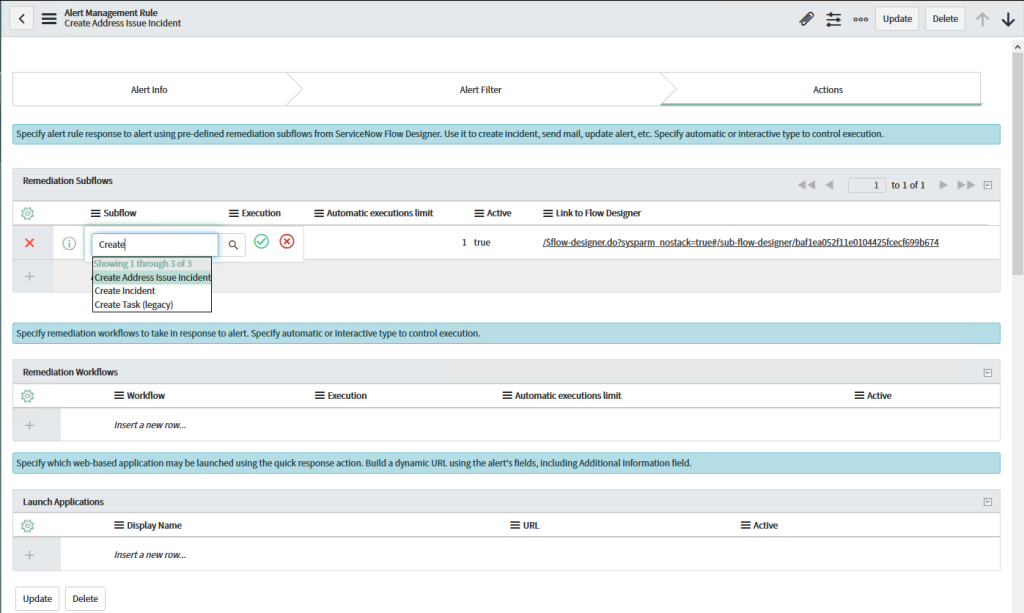
An alert management rule is defined as a configuration that is condition-based, which means it checks an alert and determines what should be done with it.
It is like having a smart filter that is automated.
- An alert is received.
- It is checked against certain conditions.
- If it is true, then something is done with it.
It could be:
- Creating an incident
- Updating an existing alert
- Assigning it to a specific group
- Updating its severity
- Suppressing it
- Auto-closing it
- Updating it with additional information
Instead of having to review an alert, ServiceNow is able to make decisions automatically.
w
Why Alert Rules Matter More Than You Think
The absence of rules makes alert management a reactive and chaotic process. In its place, teams receive and process alerts, determine what actions to take, and possibly spend time on duplicate alerts or low-impact events.
Alert management rules provide:
1. Noise Reduction
A single server down can trigger dozens of alerts. A well-configured rule can avoid creating duplicate incidents and instead update an existing one.
2. Consistency
Rules ensure that alerts are processed consistently. There is no need for dependency on personnel on shift.
3. Faster Response
The automated creation of incidents and assignment to the right assignment group can significantly reduce mean time to acknowledge (MTTA).
4. Intelligent Prioritization
Rules can modify severity levels depending on impact, business service, or configuration item (CI).
How Alert Management Rules Work Behind the Scenes
When an alert is received in the ServiceNow application, the application processes the received alert against a set of alert management rules in a predetermined order.
A set of alert management rules usually consists of the following elements:
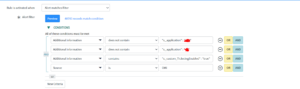
- Conditions – what needs to happen for the rule to apply
- Actions – what needs to happen when the conditions are met
- Execution Order – the order in which the rules are executed
For example:
Conditions – what needs to happen for the rule to apply
- Source = “Monitoring Tool A”
- CI Class = “Linux Server”
- Severity = “Critical”
Actions – what needs to happen when the conditions are met
- Create Incident
- Assign to Linux Support Group
- Set Priority = 1
When the conditions are met, the actions are executed on the spot. If the conditions are not met, the application proceeds to the next rule.
Common Types of Alert Rules You’ll See
In the real world, alert management rules can be used in the following ways:
Incident Creation Rules
These are the most common types of alert rules.
Deduplication or Update Rules
Instead of creating new incidents for the same alerts, rules can be used to update an alert.
This is useful for flapping devices, for instance.
Suppression Rules
Some alerts do not need to be acted upon in certain situations.
For instance, if a particular CI is in maintenance mode, the alerts can be suppressed.
Assignment Rules
Different alerts require support from different teams.
- Database alerts need to be handled by the DB team.
- Network alerts need to be handled by the network team.
- Application alerts need to be handled by the application support team.
Alert rules can be used to make these automatic.
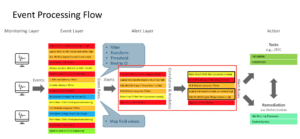
The Role of Alert Correlation
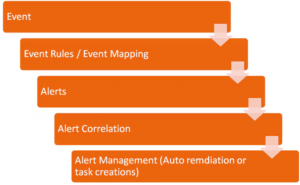
The alert management rules can be implemented in conjunction with event and alert correlation.
The correlation of related alerts combines them into a single primary alert. This means you do not have five different alerts for the same problem. Instead, you have:
- A single root alert
- Related secondary alerts
The rules determine whether an incident is created for the primary alert.
This minimizes the number of incidents and enables you to focus on the root cause rather than symptoms.
Designing Effective Alert Rules: Practical Advice
The design of effective alert rules is not about creating as many as possible. It is about creating effective ones.
Here are some lessons learned in the real world:
Start Simple
Do not attempt to implement all the automation at once. Start with incident creation rules for critical systems.
Avoid Overlapping Conditions
If two rules match the same alerts, you could end up with unpredictable results.
Test in Lower Environments
It is highly recommended that you test your rules in development or test environments before applying them to your production environment. A poorly constructed rule may inadvertently create hundreds of incidents in minutes.
Use Clear Naming Conventions
You may end up with dozens of rules as your system expands. It is highly recommended that you use clear names for your rules, such as “Critical Server Incident Creation Rule.”
Review
Infrastructure changes. Business services change. What is considered critical today may not be considered so tomorrow. It is highly recommended that you review your rules regularly.
A Simple Real-Life Scenario
Let’s assume that your organization is hosting an e-commerce application.
You will be receiving alerts from:
- Web servers
- Database servers
- Payment gateway services
- Network devices
Now, assume that your database server goes down.
Without alert rules:
- You will be receiving multiple alerts.
- You will be creating multiple incidents.
- It will be chaotic.
With well-designed rules:
- You will be correlating multiple alerts.
- You will be creating a single high-priority incident.
- You will be assigning it directly to the database team.
- You will be attaching multiple alerts to the primary incident.
That is the power of alert management rules.
How Alert Rules Can Improve Business Alignment
Another benefit of using alert rules that may not be fully appreciated is business alignment.
Using CMDB data and business services, alert rules can consider business impact in their decisions.
For instance:
- A critical alert on a test server may result in a low-priority incident.
- A critical alert on a production payment server may result in a high-priority incident.
Final Thoughts
Alert management rules in ServiceNow are not just simple automation scripts. They’re decision-making engines. They define how technical information will translate to business decisions. Well-thought-out alert management rules will simplify operations, increase efficiency, and allow teams to focus on the important issues while filtering out distractions.
There’s often an underestimate of the time required to create good alert management rules. However, once implemented, the benefits will be well worth the effort:
- More efficient operations
- More free time to deal with actual issues
- A less stressful team
If you’re dealing with an overwhelming alert system, the answer is rarely “we need more people.” More often than not, the answer will be “we need better rules.”
And that’s when ServiceNow excels—when the automation works behind the scenes, freeing up the team to focus on the issues that matter most.


No comment