For years, ServiceNow has been known as a powerful platform—but not always an easy one. Anyone who has worked with incidents, change requests, or service catalog items knows the routine: open a ticket, read through half-written descriptions, scroll through long activity streams, and try to understand what actually happened. Most of the time, the information is there… It’s just buried.
Now Assist changes that experience in a quiet but meaningful way.

Instead of adding yet another dashboard or feature users need to learn, Now Assist works in the background—reading, summarizing, suggesting, and helping you move faster without forcing you to change how you work. It’s less about automation replacing people and more about reducing the mental load that slows everyone down.
The Real Problem Isn’t Workload—It’s Cognitive Overload
In most ServiceNow environments, the issue isn’t a lack of data. It’s the opposite.
Tickets contain long descriptions, repeated comments, copied error logs, vague user messages, and half-useful updates. Analysts waste time figuring out:
- What the user actually wants
- What’s already been tried
- Whether this issue is new or recurring
- How to respond without rewriting the same message again
Now Assist steps into this exact gap.
Instead of asking you to read everything, it gives you context. Instead of asking you to type the same explanation for the tenth time, it helps you generate a response that you can edit and send.
That small shift alone can save minutes on every ticket—and over a day, that becomes hours.
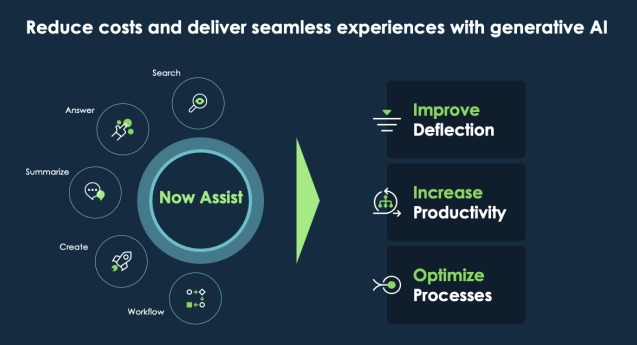
What Makes Now Assist Feel Different
Many tools promise “AI inside.” Most of them feel disconnected from real work. Now Assist doesn’t.
Because it’s built directly into ServiceNow, it understands:
- The structure of records
- The flow of incidents and requests
- The language users typically use
- The way teams actually resolve issues
This is why its suggestions feel relevant rather than generic.
When an incident comes in with a messy description, Now Assist can summarize the issue in plain language. When an analyst needs to reply, they can draft a response that sounds professional without being stiff. When knowledge articles are needed, it can help generate content based on real resolutions—not abstract templates.
It doesn’t act like a chatbot you talk to. It behaves more like a smart assistant sitting beside you, quietly helping when needed.
Incident Management Without the Guesswork
One of the strongest use cases for Now Assist is incident management.
Imagine opening a high-priority incident during a busy shift. Instead of reading twenty work notes, you get:
- A summary of the issue
- Key actions already taken
- The current status at a glance
This clarity matters. It reduces handover errors, speeds up resolution, and lowers frustration—especially in teams working across shifts or time zones.
For new analysts, this is even more valuable. They don’t have to decode senior-level shorthand or guess what matters. Now Assist highlights what’s important so they can focus on solving the problem.
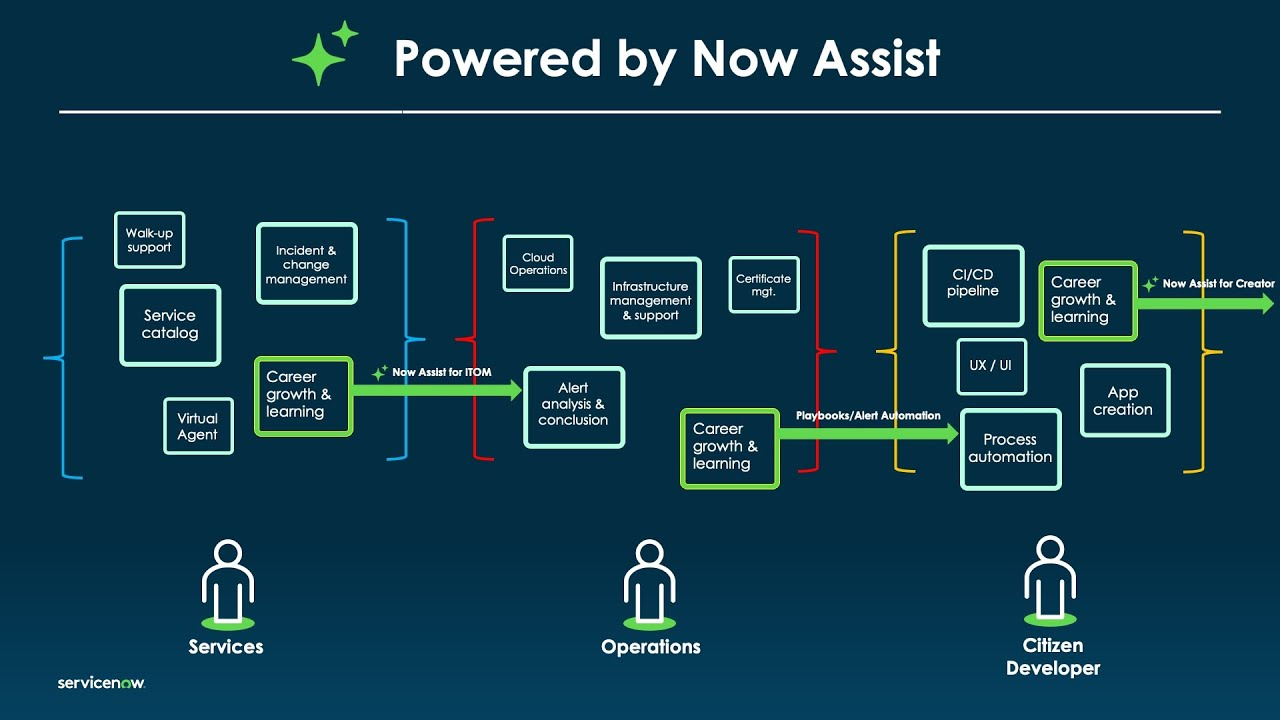
Helping Analysts Sound Like Themselves—But Better
Writing responses is a hidden time sink in ITSM.
You want to be polite but clear. Professional but human. Fast but accurate. Over time, this becomes repetitive and mentally exhausting.
Now Assist helps by drafting responses based on the situation. But here’s the key difference: it doesn’t lock you into robotic wording. You can tweak, adjust, and personalize before sending.
That means:
- Faster replies
- Consistent tone across the team
- Less emotional fatigue from constant typing
The result isn’t less human communication—it’s better communication.
Knowledge Articles That Finally Get Written
Every ServiceNow team agrees that knowledge articles are important. Very few teams enjoy writing them.
Now Assist removes the biggest barrier: starting from a blank page.
Using existing incident resolutions and problem records it can help generate draft knowledge content that actually reflects how issues are solved in the real world. Analysts don’t have to “be writers.” They just refine what already exists.
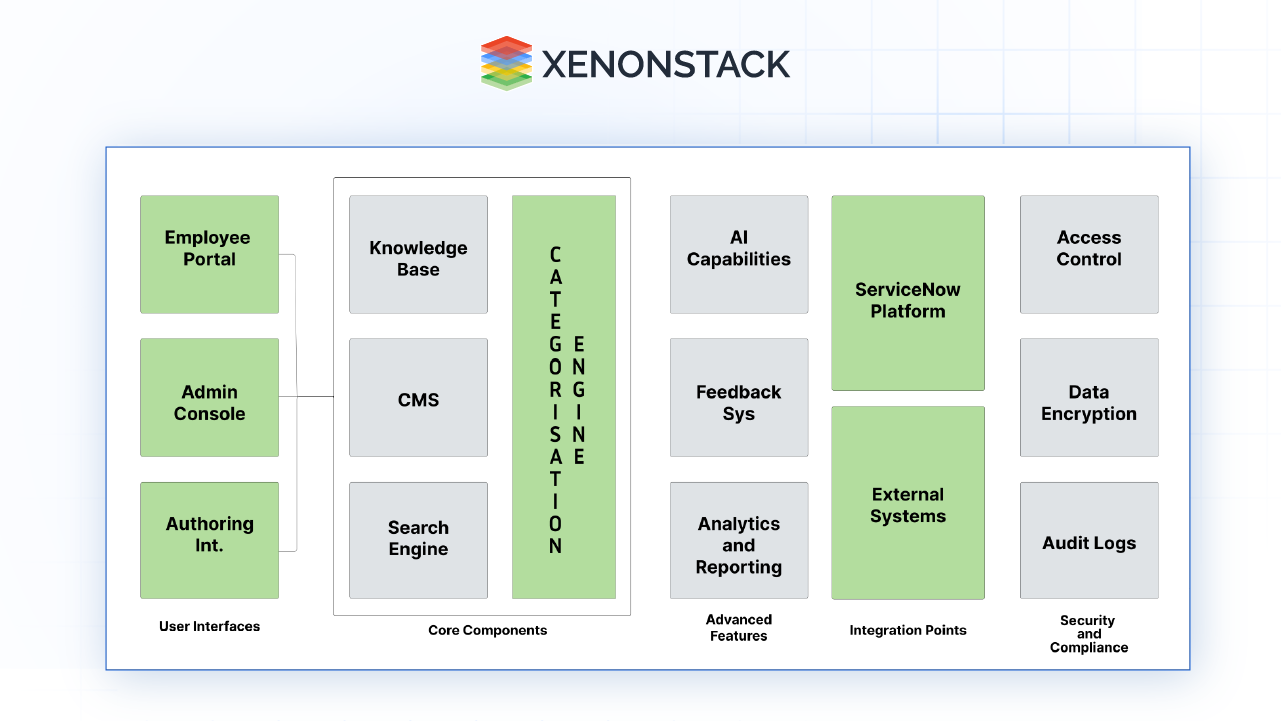
Over time, this leads to:
- More up-to-date knowledge
- Higher self-service success
- Fewer repeat incidents
And all of it happens naturally, without forcing teams into extra work.
A Subtle Shift in How ServiceNow Feels
What’s interesting about Now Assist is not just what it does, but how it changes the feeling of using ServiceNow.
- The platform feels less heavy.
- Less mechanical.
- Less draining.
You spend more time thinking and less time searching. More time solving and less time documenting. That balance is hard to achieve, and it’s where Now Assist quietly succeeds.
Not a Replacement—A Support System
It’s important to say this clearly: Now Assist doesn’t replace analysts, developers, or process owners.
It supports them.
- It doesn’t decide priority—it helps you understand it.
- It doesn’t close tickets—it helps you move them forward.
- It doesn’t remove responsibility—it removes friction.
That’s why adoption feels natural rather than forced.
Why Now Assist Matters Going Forward
As ServiceNow environments grow more complex, the old way of working—manual reading, manual summarizing, manual responding—simply doesn’t scale.
Now Assist represents a shift toward assisted work, where humans stay in control but aren’t buried under routine tasks. It respects experience, reduces noise, and gives teams back their time.
And in modern IT and enterprise service management, time isn’t just money—it’s focus, quality, and sanity.
Final Thoughts
Now Assist isn’t loud. It doesn’t show off. It doesn’t demand attention.
It just helps.
And sometimes, that’s exactly what a platform needs to do.
If ServiceNow is the engine that runs enterprise workflows, Now Assist is the quiet intelligence that keeps it running smoothly—without burning out the people behind the screen.


