ServiceNow Change Management: Transforming Chaos into Managed Change
Every modern business revolves around change. Whether it’s introducing a new application, upgrading infrastructure, or fixing a major bug, change is inevitable. The issue is that without structure, change can quickly spiral out of control, resulting in user disruptions, outages, and even compliance nightmares.

This led to the creation of change management, and ServiceNow has become the go-to platform for companies seeking to transform how they plan, approve, and implement change. This blog explores how ServiceNow Change Management helps organizations move from uncertainty to confidence so that every change adds value rather than risk.
What is meant by ServiceNow’s Change Management?
The core goal of ServiceNow’s Change Management is to oversee the development of changes to IT processes and systems. It ensures that:
- Changes are evaluated suitably,
- There are fewer risks,
- Records of approvals are kept.
- Additionally, there is minimal disruption throughout the implementation process.
Beyond merely digitizing forms, ServiceNow provides an end-to-end framework that unifies people, technology, and processes into a single, smooth flow.
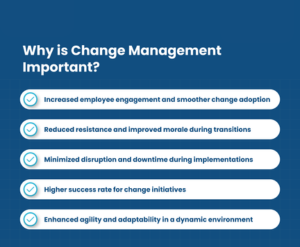
The Importance of Change Management
Think about the following situation: A patch is secretly installed into production by a database administrator. Thousands of workers lose their weekly wages when the payroll program suddenly crashes. The IT staff scrambles to find the issue while the leadership responds to angry calls.

All this chaos could have been avoided if there was a structured change process in place. Change Management exists to answer three critical questions:
- What’s changing?
- What’s the risk?
- Who approves and monitors it?
Without these answers, IT changes are accidents waiting to happen.
Types of Changes in ServiceNow
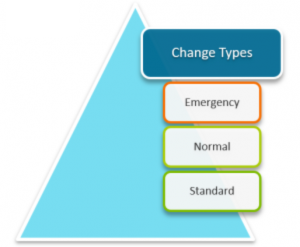
Not all changes are equal. ServiceNow classifies them into categories so they can be handled appropriately:
- Standard Change
- Pre-approved, low-risk, and repeatable.
- Example: Adding a new user account or upgrading a laptop.
- Normal Change
- Requires risk assessment, approvals, and planning.
- Example: Installing a new server or rolling out a new feature.
- Emergency Change
- Urgent and high priority, often to fix major outages.
- Example: Applying a security patch to stop an active cyberattack.
Bureaucracy only slows down the most dangerous changes, thanks to this classification.
The Change Lifecycle of ServiceNow
A well-thought-out change follows a predictable course. In ServiceNow, this lifecycle typically looks like this:
- Request for Change (RFC): The process begins when a change request is submitted.
- Impact, risk, and resource requirements are evaluated.
- Approval: Depending on the type and degree of risk, managers or a Change Advisory Board (CAB) may give approvals.
- Planning and Scheduling: Change implementation timelines and protocols are set.
- Implementation: The change is implemented using logs and documentation.
- Review & Closure: The post-implementation review ensures success and identifies lessons learned.
This procedure ensures accountability at every turn, from request to review.
Crucial Components of Change Management in ServiceNow
- The Change Advisory Board’s (CAB) workbench
ServiceNow’s CAB workbench provides a centralized dashboard for reviewing and approving changes. The need for numerous emails is eliminated because CAB members can view all pending changes, risks, and schedules in one place.
- Risk Assessment Engine
Every change request in ServiceNow has a risk calculator. By offering a risk score based on data like prior failures, impacted services, and potential conflicts, this assists teams in making well-informed decisions.
- Recognizing Conflicts
A suggested modification’s compatibility with other planned modifications or significant business events is automatically assessed by ServiceNow. This prevents “collision” scenarios, where multiple changes interfere with the same system at the same time.
- Automation of Workflow
Task assignments, notifications, and approvals are all automated with Flow Designer. There is no need for manual tracking as everything moves through the workflow.
- Integration of CMDB
The Change module is closely integrated with the Configuration Management Database (CMDB). Because modifications can be linked to the precise servers, applications, or services they impact, risk assessment becomes more precise.
The Best Methods for ServiceNow Change Management
- Standardize whenever possible.
It shouldn’t be too difficult to make simple changes. Repeatable changes should be moved to the Standard Change catalog to save time.
- Strike a Balance Between Speed and Control
Excessive bureaucracy hinders innovation. A little too little invites danger. You can find the sweet spot with ServiceNow workflows.
- Make Use of Dashboards to Promote Openness
Dashboards show success rates, approval bottlenecks, and impending changes. Distribute these to the appropriate parties for alignment.
- Configure Notifications Automatically
Notify the relevant parties. Automated alerts reduce miscommunication and ensure everyone knows when and how changes will happen.
- Examine, Gain Knowledge, and Get Better
Perform a Post-Implementation Review following every significant modification. Was it a success? What could have been done more efficiently? Make use of these insights to guide future processes.
Real-World Example: A Telecom Giant’s Transformation
Unplanned changes caused frequent outages for a major telecom provider. There was a lot of downtime during peak hours as a result of engineers evading approvals.
After ServiceNow Change Management has been deployed:
- They automated approvals using risk scores.
- For CAB meetings, ServiceNow’s workbench took the place of spreadsheets.
- Standard changes were routed directly with no delays.
In just six months, unplanned outages dropped by 45%, and leadership was able to witness all of the noteworthy changes.
- Reduced Failure Risk: Outages are reduced as a result of systematic planning.
- Faster Approvals: By eliminating manual bottlenecks, automation speeds up approvals.
- Compliance & Audit Readiness: To ensure compliance and audit readiness, comprehensive records of approvals and implementations are required.
- Improved Collaboration: CAB and stakeholders have a common platform.
- Business Confidence: Leaders understand that change is controlled rather than uncontrolled.
In short, ServiceNow doesn’t just manage changes—it builds trust in change.
Concluding remarks
Change is unavoidable. But chaos isn’t. ServiceNow Change Management allows organizations to deploy new processes, technologies, and fixes without fear of causing disruptions.
It is not just an IT process; it is a business enabler. By moving from firefighting to structured transformation, businesses can improve customer service, innovate faster, and become more resilient to risks.
In a world where technology is evolving every day, organizations that manage change well are the ones that stay ahead of the curve. That is made possible by the structure, automation, and intelligence that ServiceNow provides.
So, the next time someone asks, “Is it possible for us to implement this change?” The answer will be
“Yes—safely, efficiently, and confidently” using ServiceNow.


