Tables, records, forms, flows, business rules, widgets, integrations, and a plethora of other moving components are all readily apparent when you first enter the world of ServiceNow.
But among all these big concepts, some small elements quietly hold everything together. One of those tiny yet powerful building blocks is the Single Line Text variable type.
At first glance, it looks almost too simple. A small text box. A basic input field. Nothing exciting, right?
But once you start designing catalogs, building flows, or shaping service experiences, you discover that this small text box is usually the place where your users tell you exactly what they want. And that’s where the magic begins.
In this blog, we’re going to go deep into the Single Line Text variable type—not just what it is, but how it works, how admins use it, and why it quietly plays such an important role in creating clean, user-friendly ServiceNow interactions.

A Single-Line Text Variable: What Is It?
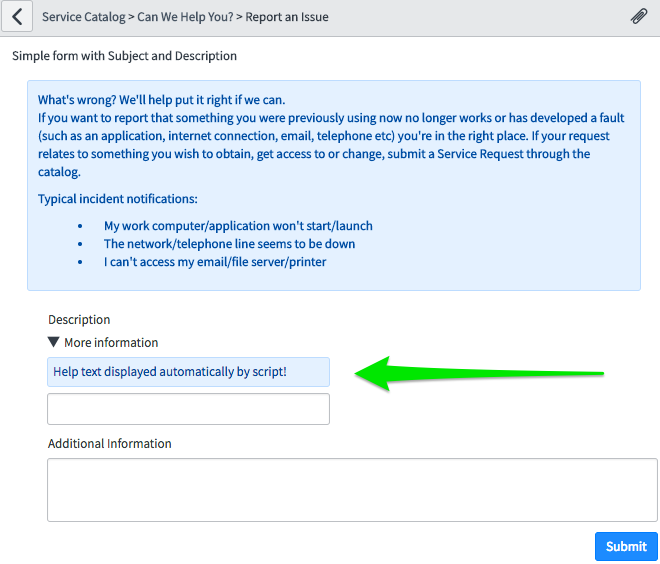
In the simplest words, a Single Line Text variable is a field that allows the user to enter short, plain text on a single line. You use it when you need information that is:
- Short
- Direct
- Descriptive
- Not stored as a reference to another table
- Not part of a long explanation
Think of it as a digital sticky note where your user writes a quick one-liner to help complete a request.
Here’s what you can type into a Single Line Text field:
- Names
- Short descriptions
- Codes
- Titles
- IDs
- Messages
- Any simple text that fits in one line
It’s clean, simple, and lightweight.
Why Admins Use It So Often
If you’ve designed catalog items or record producers, you already know how often “a small text field” is needed. The reason is simple — not every piece of data belongs in a dropdown or reference field.
Sometimes you just need a quick human answer.
Here are real-life admin scenarios:
- “Enter your Wi-Fi device name.”
- “Write a short subject for your request.”
- “Enter meeting room number.”
- “Provide a short error message.”
- “Write the project code.”
These inputs don’t need a long paragraph or a detailed explanation. They just need a clear, short text—perfect for Single Line Text.
Where You Will See It in ServiceNow
You use Single Line Text variables in:
- Service Catalog Items
- Record Producers
- Order Guides
- Workflow Inputs
- Flow Designer Actions
- Custom Forms
- UI Pages or UI Policies
And because it’s so simple, it doesn’t add weight or complexity to the record.
Single Line Text vs. Multi Line Text – What’s the Difference?
This is one question new admins often mix up. The difference is very simple but important.
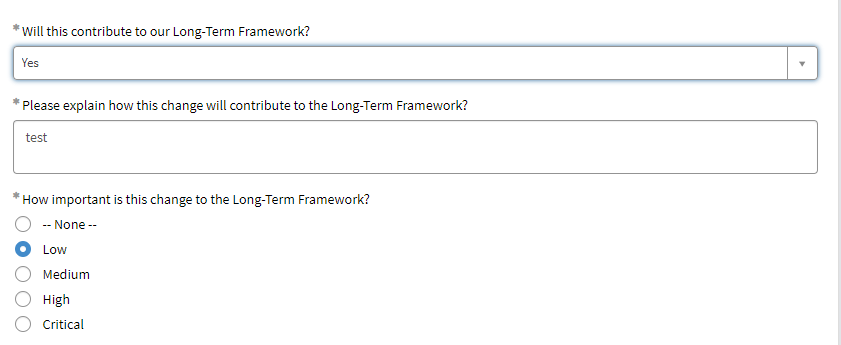
Single Line Text
- Only one line
- Short content
- No formatting
- For small inputs
Multi-Line Text
- Allows long paragraphs
- Can store detailed explanations
- Used for comments or descriptions
- Larger box on form
If your variable looks like something a user will type in 1–2 seconds, use Single Line Text.
If it looks like something a user will type in 1–2 minutes, use Multi-Line Text.
Key Properties That Matter
Single-line text variables come with some useful properties:
1. Max Length
You can control how many characters the field allows.
- Want a max of 10 characters because the ID is always short?
- Simply establish the limit.
This keeps your data clean and predictable.
2. Default Value
You can set a default if you want the field to display a common value or recommendation automatically.
For instance:
- “N/A”
- “Enter title here.”
- A prefix like “REQ-“
This prevents blank submissions and saves the user time.
3. RegEx Validation (Very Helpful)
Admins often forget that Single Line Text supports Regular Expressions.
This suggests that specific formats can be made to be accepted by the field.
For instance:
- Just numbers
- Only letters
- Only 6-digit codes
- Email address pattern
- No special characters
This keeps user data clean and prevents junk entries.
4. Required or Read-Only
Depending on the scenario, you can make the field:
- Essential (necessary)
- Read-only (not editable)
- Hidden (shown only when needed)
You can dynamically control this with UI Policies and Client Scripts.
How Users Interact With It
The most convenient field type is single line text:
- Click
- Type
- Go ahead
There are no links, dropdown menus, or searching. This simplicity is the reason ServiceNow UX teams recommend using Single Line Text whenever the platform doesn’t require structured data. When you reduce friction, the user completes the form faster — which means fewer abandoned catalog items and fewer incomplete requests.
Why Single Line Text Is So Important for Clean Data
In ServiceNow, clean data is everything.
Good data is essential for your reports, dashboards, flows, and SLAs.
Data is kept clean by single-line text because:
- It restricts the quantity of text.
- It directs users to provide clear answers.
- It stays away from lengthy, superfluous descriptions.
- Forms are kept brief and amiable.
- RegEx validation filters out incorrect formatting.
Although it looks like a small feature, it significantly reduces noise in your database.
Best Practices for Using Single Line Text
If you want to use it like an expert, keep these tips in mind:
- Keep your label clear
Tell the user exactly what you expect from them.
- Bad label: “Enter detail”
- Good label: “Enter Device Serial Number”
- Use help text
A small hint under the field can avoid many issues.
- Example: “Example: SN-12982”
- Apply RegEx when you need clean formatting
If you know the format, force it.
Your future self—and your reports—will thank you.
- Set a reasonable max length
Users shouldn’t type paragraphs.
Keep it short.
- Don’t use it when a structured field is needed
If the data belongs inside a reference field (like selecting a user or CI), don’t use Single Line Text.
Examples from Real Projects
Here are some real-world examples where Single Line Text made life easier:
IT Support Catalog
- “Enter your laptop name.”
- “Short issue summary”
HR Request
- “Employee ID”
- “Department Code”
Facilities Request
- “Room Number”
- “Building Name”
Finance Request
- “Project Code”
- “Vendor Name”
Just one line — but it completes the request beautifully.
The Hidden Power Behind the Simplicity
The interesting thing about ServiceNow is that the simplest elements often have the biggest impact on user experience. Single Line Text is one of those elements.
It doesn’t look fancy.
It doesn’t have complex options.
However, it keeps your data organized, your forms tidy, and your users at ease.
It serves as a reminder that sometimes selecting the most straightforward and efficient tool is just as important to good design as adding more features.