From Undiscovered Links to Business Clarity through Service Mapping in ServiceNow
Nothing functions in isolation in contemporary IT environments. Databases are dependent on servers, which are dependent on networks, and networks are dependent on configurations that may span several data centers or cloud providers.

“What broke?” isn’t the only question to ask when something goes wrong. “What else is affected?” is the question.
Service Mapping in ServiceNow is crucial in this situation. It is a business enabler that bridges the gap between services and infrastructure in a way that promotes quicker resolutions, more informed choices, and increased operational confidence. It is more than just a technical feature.
Let’s examine why service mapping is becoming essential in enterprise IT and what makes it more than just another discovery tool.

The Problem: Blind Spots in IT
Traditional IT discovery tells you what you have: servers, and applications, network devices. That’s useful, but it’s not enough.
If an application fails, knowing there’s a server hosting it is only part of the puzzle. What about the load balancer routing requests? Are important transactions being stored in the database? Which API endpoints are necessary for it to function? Are the cloud resources located in a different area?
Without this relationship context, troubleshooting becomes guesswork, and changes become risky.
What Does ServiceNow’s Service Mapping Mean?
IT discovery is advanced through the use of service mapping. It maps the connections between devices and apps rather than merely locating them, demonstrating how each element helps provide a business service.
Consider it the distinction between:
- An ingredient list (Discovery)
- The recipe that demonstrates how they work together (Service Mapping)
By using service mapping, you can understand not only what is in your environment but also how it functions as a whole.
The Operation of Service Mapping
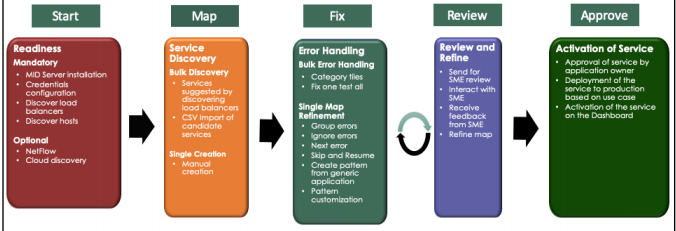
In ServiceNow, service mapping follows a top-down methodology:
- Determine the Entry Point: which is typically an IP address, load balancer, or application URL.
- Trace the Dependencies: To identify related components, track network traffic, configurations, and application calls.
- Make a Map: In the CMDB, make a dynamic, visual service map that displays all of the connected CIs (Configuration Items) and their connections.
- Continue to Maintain: Maps should be automatically updated whenever new elements are found or modifications are made.

The “Aha!” Moment: Its Significance
The secret is that after you’ve set up service maps, you can:
- See which business services are affected by an outage right away.
- Make decisions about changes while fully aware of the risks involved.
- Prioritize incidents not only for their technical severity but also for their business impact.
- Accurate dependency documentation will increase compliance.
It’s the difference between entering a room with lights on and fighting a fire in the dark.
An Actual Case
Let’s say your online storefront fails.
Absent Service Mapping:
- The issue ends up in the “Payment system error” IT queue.
- After reviewing logs, the app team contacts the database team and then the API team.
- As everyone looks into their own piece of the puzzle, hours go by.
Using Service Mapping:
- The CMDB’s Checkout Service Map is connected to the incident.
- The map displays the precise third-party API, middleware, and database that are used.
- Since a recent modification, the database node displays a CPU spike.
- You know the root cause and the impacted service within minutes.
That’s business-focused troubleshooting.
Unique Features That Set It Apart
Unlike static documentation, ServiceNow’s Service Mapping:
- Updates dynamically – No more stale diagrams.
- Works in cloud – on-premises, or hybrid environments.
- Links directly to incidents, changes, and problems – Keeping all teams aligned.
- Integrates with ITOM Health – so alerts are tied directly to business services.
Service Mapping vs. Discovery: A Quick Comparison
| Feature | Discovery | Service Mapping |
| Purpose | Identify devices/apps | Show how they connect to deliver services |
| Approach | Bottom-up | Top-down |
| Output | List of assets in CMDB | Dynamic service dependency maps |
| Impact | Inventory accuracy | Business impact visibility |
The takeaway: Discovery tells you what you have, Service Mapping tells you how it works together.

The Advantages for the Business
Service mapping offers genuine business benefits and is not just for IT.
- Faster Mean Time to Resolution (MTTR): Take more action and less guesswork.
- Reduced Change Risk: Before making changes, a visual impact analysis is conducted.
- Better Compliance: Dependency documentation for audits that is accurate and current.
- Improved Prioritization: Give priority to issues that impact high-value services first.
- Collaboration Across Teams: Everyone uses the same “service language.”
Common Errors to Steer Clear of
Errors can occur even with a strong tool like Service Mapping:
- Not defining services clearly: Services that are not well defined will be difficult to map if you are unable to describe them in business terms.
- Initial rollout overcomplication: Start with high-impact services first, then grow.
- Ignoring updates: A service map is only useful if it accurately depicts the situation.
- Ignoring business teams: IT and the business collaborate on service mapping.
How to Begin Wisely
If service mapping is new to you:
- Select a valuable service- that is important and obvious to the company.
- Work together with stakeholders- to comprehend the service from the viewpoint of the user.
- Use Discovery + Service Mapping together – Create a solid CMDB foundation by combining Discovery and Service Mapping.
- Automate updates – Scheduled scans and event tracking help keep maps up to date.
- Integrate with incident/change workflows – Make the maps actionable by integrating them with incident/change workflows.
Concluding remarks
In ServiceNow, service mapping is more than just an attractive diagram. The goal is to translate technical intricacy into business-oriented clarity.
It enables you to see not just what is flawed but also the implications for the company. It gives IT the ability to work more efficiently, collaborate more effectively, and confidently provide services.
Service Mapping serves as the link between infrastructure awareness and business assurance in a world where every second of downtime can cost thousands or even millions of dollars.
When you get the hang of it, you’re managing important services rather than just systems.