
TOP 5 SERVICENOW INTEGRATIONS FOR YOUR BUSINESS
In today’s fast-paced digital world, organizations are always on the lookout for ways to streamline their processes, boost efficiency, and improve productivity. To streamline operations, enhance communication, and promote collaboration among different departments, businesses must embrace integrated solutions that seamlessly integrate with one another.
This is exactly where ServiceNow shines. While it’s primarily known for its robust IT service management (ITSM) capabilities, the platform’s true potential is realized when it seamlessly integrates with other crucial tools that your organization already utilizes. These integrations not only improve the functionality of ServiceNow but also provide innovative ways to simplify workflows, streamline processes, and ultimately increase productivity.
If you’re contemplating the integration of ServiceNow into your technological infrastructure, let’s delve into five impactful integrations that can greatly enhance your operational efficiency.

WHY INTEGRATE WITH SERVICENOW?
Envision ServiceNow is the central hub for managing various tasks such as service requests, incident handling, approvals, and more. Its real strength lies in its ability to connect with other applications, allowing smooth data transfer and task management without the constant need to switch between platforms.
STRATEGIC INTEGRATIONS CAN HELP ORGANIZATIONS ACHIEVE:
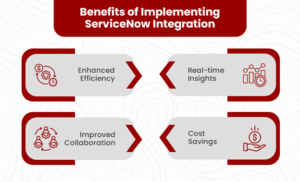
- Reduction in Manual Work: Automate repetitive tasks to free up valuable employee time.
- Enhanced Process Automation: Streamline routine processes, allowing employees to focus on higher-value tasks.
- Improved User Experience: Create a frictionless interaction environment for users across multiple platforms.
- Greater Visibility Across Departments: Foster better collaboration and understanding between teams by providing access to relevant information.
Now, let’s delve into the top five integrations that can yield substantial benefits for your business.
-
SERVICENOW + MICROSOFT 365: INTEGRATING SUPPORT INTO EVERYDAY WORKFLOWS
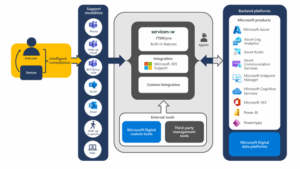
Microsoft 365 is an indispensable suite for countless organizations, serving as the backbone for tasks like emailing, scheduling, and team collaboration. When you integrate ServiceNow with Microsoft 365—especially tools like Teams, Outlook, and Azure Active Directory—you empower your support and IT teams to operate more efficiently within the applications that your employees use daily.
KEY BENEFITS:
- Teams Integration: Employees can easily open, view, and update incidents directly from Microsoft Teams without switching apps.
- Outlook Add-In: Convert emails into ServiceNow tickets with just one click, streamlining the ticket creation process.
- Azure Active Directory Integration: Automates identity management, making user provisioning and deprovisioning smoother.
WHY IT’S A GAME-CHANGER:
This integration eliminates the hassle of toggling between applications, allowing end users to interact with ServiceNow directly within Microsoft tools. It’s particularly effective for improving response times and reducing ticket volumes—especially with the self-service capabilities offered through Teams chatbots and virtual agents.
-
SERVICENOW + SAP: HARMONIZING BUSINESS AND IT OPERATIONS
As a leader in enterprise resource planning (ERP), SAP covers critical business functions such as finance, procurement, and human resources. Integrating SAP with ServiceNow allows these systems to work in unison, bridging the often-overlooked gap between IT support and core business operations.
KEY BENEFITS:
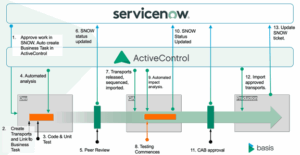
- Real-Time Data Synchronization: Keeps employee, vendor, and asset information updated across both platforms.
- Incident-to-Task Workflow: Automatically generates SAP tasks from ServiceNow incidents, ensuring a streamlined response to issues.
- Workflow Automation: Efforts like approvals and escalations can be effectively managed across both systems.
WHY IT’S A GAME-CHANGER:
For organizations using SAP in their backend processes, this integration eliminates data duplication and reduces delays in service resolution. It ensures that IT processes are closely aligned with business workflows, fostering better collaboration and minimizing errors.
-
SERVICENOW + ZOOM: ELEVATING LIVE SUPPORT AND INCIDENT MANAGEMENT

With remote and hybrid work settings becoming the norm, effective virtual communication tools are crucial. When paired with ServiceNow, Zoom enhances incident management and support services.
KEY BENEFITS:
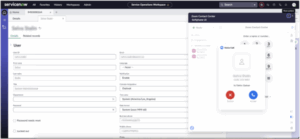
- Launch Meetings from Tickets: Initiate a Zoom call directly from a ServiceNow incident or change request, ensuring immediate support.
- Session Data Logging: Automatically log information such as meeting attendance and duration linked to the relevant ServiceNow ticket.
- Rapid Escalation: Escalate support requests to a live conversation quickly, facilitating real-time resolutions.
WHY IT’S A GAME-CHANGER:
This integration is incredibly beneficial for high-priority support cases or collaborative efforts across teams. By minimizing lengthy back-and-forth correspondence, your teams can address issues as they arise, leading to faster service delivery and enhanced customer satisfaction.
-
SERVICENOW + GOOGLE WORKSPACE: STREAMLINED COLLABORATION FOR MODERN TEAMS
Google Workspace (formerly G Suite) powers many modern organizations with tools like Gmail, Google Calendar, Drive, and Chat. By integrating these applications with ServiceNow, you can significantly improve productivity and leverage smart automation capabilities.

KEY BENEFITS:
- Gmail Integration: Convert emails into ServiceNow tasks or incidents directly from your inbox, streamlining task management.
- Calendar Sync: Schedule and track ServiceNow tasks alongside your Google Calendar event, helping prioritize workloads effectively.
- Google Chat Bot: Enable users to submit tickets or check status updates through Google Chat, enhancing accessibility.
WHY IT’S A GAME-CHANGER:
For teams already utilizing Google Workspace, this integration simplifies access to ServiceNow, making it easy for employees to initiate service requests or resolve issues without leaving their main work tools.
-
SERVICENOW + OKTA: SIMPLIFYING IDENTITY AND ACCESS MANAGEMENT
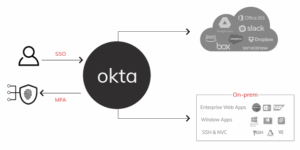
Integrating ServiceNow with Okta offers organizations a more seamless approach to managing identities and access rights. This not only strengthens security but also enhances user experience by simplifying the login process.
KEY BENEFITS:
- Single Sign-On (SSO): Provides a unified login experience for users across all applications, reducing friction and increasing security.
- Automated User Provisioning: Streamlines the onboarding and offboarding processes, ensuring that access rights are managed efficiently.
- Visibility and Compliance: Helps maintain compliance with various regulations by providing transparent access management.
WHY IT’S A GAME-CHANGER:
By connecting ServiceNow with Okta, organizations can better secure their data while simplifying user access to essential services. This integration is particularly beneficial for maintaining a high level of security and reducing administrative overhead.
FINAL THOUGHTS
Integrating ServiceNow with the right platforms can dramatically increase its value to your organization. Instead of working in silos, your tools will communicate, collaborate, and coordinate—leading to faster service delivery, fewer errors, and better experiences for both users and support teams.
The five integrations we’ve explored—Microsoft 365, SAP, Zoom, Google Workspace, and Okta—are trusted by thousands of businesses worldwide. Each offers unique benefits depending on your organization’s size, industry, and digital maturity.
If you’re in the consideration phase, take a moment to reflect: Which of these integrations align with your business priorities? Start there, and you’ll be well on your way to building a more connected, intelligent enterprise.


No comment