
ServiceNow’s Variable Sets: Intelligent and Reusable Catalogue Design’s Hidden Power
If you have spent some time creating catalogue items in ServiceNow, you already know how easily things can get messy. One catalogue item requires a text field, another requires a dropdown, and before you know it, you are making the same variables over and over again. In addition to being exhausting, it causes inconsistencies: one catalogue item uses “Email Address,” another uses “Official Email,” and a third uses “Work Email.”
This is precisely the purpose of variable sets. They are one of those features that don’t look glamorous but quietly save you hours of repetitive work. The more catalog items your organization uses, the more valuable Variable Sets become. They make your entire service catalogue more polished and much simpler to manage by adding structure, reusability, and consistency.
I’ll explain what variable sets are, why they’re important, how they operate in the background, and how they make catalogue designers’ and administrators’ lives easier.
A Variable Set: What Is It?
A variable set is, in essence, a reusable container for multiple variables.
Instead of making the same variables for different catalogue items over and over again, you combine them into a Variable Set and attach the entire set wherever you need it.
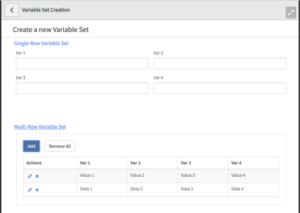
Think of it like building reusable “blocks.”
Instead of recreating a block from scratch every time, you drag and drop the same block into multiple catalog items or record producers.
For example, imagine these common fields:
- Employee Name
- Department
- Manager
- Location
You can create a Variable Set called “Employee Info Set” and use it across dozens of catalog items. Any change you make in that set instantly reflects everywhere it is used. That’s the real magic.
Why Variable Sets Matter More Than Most Admins Realize
In the early stages of building a catalog, it often seems simpler to create variables separately for each item. But as your service catalogue grows, this becomes inefficient, erratic, and prone to mistakes.
This is the reason variable sets are so useful:
1. They save a lot of time.
- Instead of creating the same five or ten variables repeatedly, you create them once and use them forever.
- It saves a great deal of time.
2. They Improve Consistency Across Catalog Items
- With Variable Sets, the same labels, same choices, and same formatting appear everywhere.
- Your catalog feels clean and professionally designed.
3. They Cut Down on Maintenance Work
- You only update a variable in the Variable Set once if it needs to be updated, such as with a new dropdown option or a new regex check.
- The update is automatically applied to all catalogue items that use it.
4. They Make Complex Catalogue Items Easier to Create
- Instead of scrolling through dozens of individual variables, you organise your catalogue item using several smaller, significant variable sets.
5. They Encourage Modular Design
- Similar to modular programming, Variable Sets promote the division of large forms into reusable components.
- You begin to question how you managed without them once you start using them regularly.
Where to Use Variable Sets
Variable sets are supported in:
- Products in the Catalogue
- Record Producers
- Ordering Guidelines
They are very helpful when building large internal service portals with recurrent fields, like those for HR, IT services, hardware requests, and onboarding procedures.
How Variable Sets Work Behind the Scenes
Although Variable Sets appear simple on the surface, there’s a well-organized structure behind them.
A Variable Set consists of:
- A container
- The variables inside it
- Script Includes or UI policies linked to the set.
- Client scripts
- Layout configurations
When you attach a Variable Set to a catalog item, ServiceNow doesn’t “copy” the variables.
Instead, it references them. That means:
- They behave like part of the catalog item.
- They follow the same rules as individual variables.
- They remain editable only from the Variable Set, not the item.
This is what makes the setup both powerful and safe.
Types of Variable Sets
ServiceNow provides two broad types:
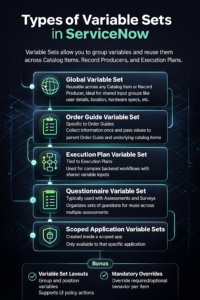
1. Standard Variable Sets
- These are the classic reusable sets used across catalog items.
2. Sets of Global Variables
- A more recent version (UI16 and later), in which variables are automatically added to every catalogue item without the need for manual attachment.
- These work great for fields that apply across the entire company, such as “Requested For.”
A Practical Illustration to Comprehend the Potential of Variable Sets
Imagine your company manages around forty catalog items related to hardware requests, onboarding processes, and employee access.
Every form requires basic employee information — name, department, email, employee ID, and manager.
If you create these fields individually for each catalog item:
- You repeat the work
- You risk naming mistakes.
- Updating anything becomes a maintenance nightmare.
- Reporting starts to fluctuate
Let’s say you now create a variable set named:
“Requester Information”
Within it, you include:
- ID of the employee (lookup select box)
- Email (only for reading)
- Supervisor (Source)
- Department (populated automatically)
This Variable Set is now attached to each of the 40 catalogue items.
If you modify how the Manager field behaves—such as adding an onChange script—you only update it once, and every catalog item instantly benefits from the change.
Suddenly, your forms look cleaner, your admin workload reduces, and your customers enjoy a uniform experience.
How Variable Sets Make Your Catalog More Professional
Variable Sets don’t just help admins. They make the overall experience better for end users.
Here’s how:
- Forms look more structured.
- Fields appear across various items in recognisable layouts.
- Users don’t feel confused switching between catalog items.
- Repeated fields behave consistently everywhere.
This reduces errors and support tickets and increases the adoption of the self-service portal.
How to Use Variable Sets Most Effectively
To make the most of them, keep in mind these tips:
1. Give Your Variable Sets Clear Names
Steer clear of terms like “General Variables” or “Set 1.”
Use named ranges that explain the goal, such as:
- “Laptop Details Set”
- “Contact Set for Employees”
- “Software License Information Set”
2. Keep Sets Concentrated and Small
- Avoid combining 20 unrelated variables into one set.
- Reuse of modular sets is easier.
3. Utilise UI policies and client scripts at the specified level
- This guarantees uniformity in conduct everywhere.
4. Avoid duplicate variable names
- Even within sets, use clear, descriptive names.
5. Steer clear of hardcoding catalogue item names in scripts.
- Variable sets should be connected to generic scripts.
Final Thoughts
Variable sets may seem like a small feature, but they have a subtle impact on how you create and manage your service catalogue. They make your portal feel more sophisticated for each user, cut down on tedious tasks, and preserve consistency. You will find that once you learn to use Variable Sets properly, they are not just a convenience, but an integral part of scalable catalogue design. With Variable Sets, you have a clean, organized, and future-proof way of managing your forms without becoming mired in manual labor, whether you’re building five catalogue items or five hundred.





No comment