
Cracking the Code of SLA in ServiceNow: Beyond the Stopwatch
When people hear the term SLA, the first thought is often a ticking clock—counting down to a deadline. While that’s technically accurate, Service Level Agreements (SLAs) in ServiceNow go far beyond timers and countdowns. They represent expectations, accountability, and performance commitments in the heart of IT service delivery.
But here’s the truth: most organizations only scratch the surface of what SLAs can do. They treat them like passive timers instead of what they truly are—strategic tools to drive better service, faster resolution, and continuous improvement.
So, let’s take a deep dive and crack the code of SLA in ServiceNow, moving beyond just watching the clock to truly managing and enhancing service performance.

What Is an SLA?
A Service Level Agreement is a commitment between a service provider and its customer that defines expected levels of service, particularly around response and resolution times.
In ServiceNow, SLAs are applied to tasks such as:
- Incidents
- Service Requests
- Change Requests
- Problems

They determine how much time an assigned team must respond or resolve a record based on defined conditions—typically related to priority or urgency.
But here’s the twist: ServiceNow’s SLA engine isn’t just a timer. It’s a dynamic, condition-driven engine capable of adapting to workflows, pausing during inactivity, triggering escalations, and offering real-time visibility.
How SLAs Work in ServiceNow
At the core, every SLA in ServiceNow follows four essential conditions:
- Start Condition – When should the SLA begin? (e.g., when an incident is assigned)
- Pause Condition – When should the timer pause? (e.g., waiting for customer input)
- Stop Condition – When Should It End? (e.g., when the incident is resolved)
- Reset Condition – When should the timer reset? (e.g., priority change)
Each SLA also includes a duration, often defined by priority level, like:
- P1 (Critical): Resolve within 1 hour
- P2 (High): Resolve within 4 hours
- P3 (Medium): Resolve within 8 hours
- P4 (Low): Resolve within 2 business days
SLA Types in ServiceNow
ServiceNow tracks three core agreement types:
- SLA (Service Level Agreement): For external or end-user expectations.
- OLA (Operational Level Agreement): Between internal teams to support SLAs.
- UC (Underpinning Contract): With third-party vendors or service providers.
Understanding all three is essential for enterprises that manage multi-layered service chains.

Why SLAs Matter (More Than You Think)
SLAs aren’t just there to satisfy compliance. When used right, they create transparency, discipline, and improvement.
They Drive Accountability
An SLA communicates what’s expected from the support team. Everyone knows their window to act.
They Prioritize Work
Not all tickets are created equal. SLA timers help teams focus on what’s urgent, avoiding random work queues.
They Enable Escalations
When an SLA is about to breach, ServiceNow can trigger automated notifications or escalations, reducing last-minute firefighting.
The Power Analytics
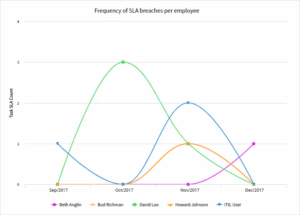
ServiceNow’s reporting can show SLA compliance trends, identify bottlenecks, and measure individual/group performance.
Real-World Example: SLA in Action
Imagine this:
A VIP user logs a critical incident because the finance system is down during month-end reporting.
- The incident triggers a P1 SLA with a 1-hour resolution target.
- The SLA starts as soon as the ticket is assigned.
- 20 minutes in, the issue is handed over to another team.
- The timer keeps running.
- 45 minutes in, the record is updated with “Awaiting User Info” → SLA pauses.
- Once the user replies, the SLA resumes.
- The issue is resolved in 50 active minutes—SLA met.
This isn’t just a timer—it’s a smart tracker that understands context and dynamically adjusts.
Common SLA Mistakes and How to Avoid Them
Despite their importance, SLAs are often poorly configured. Let’s look at some common pitfalls:
1. Setting Unrealistic Durations
Not all issues can be solved in an hour. Match your SLA durations to actual team capabilities, not just customer expectations.
2. Ignoring Pause Conditions
Without proper pause rules (like “Awaiting Info”), teams are unfairly penalized for delays outside their control.
3. Using Too Many SLA Definitions
Overloading the system with complex or duplicate SLA definitions can confuse. Please keep it clean and logical.
4. Forgetting Business Hours
SLAs should respect operating hours. If your team works 9 to 5, don’t let a weekend breach the SLA.
Reporting and Dashboards: SLA’s Secret Weapon
What gets measured gets managed. With SLA data, ServiceNow gives you powerful insight:
- % of SLAs met vs. breached
- Resolution time by team, category, or priority
- Trends in performance by week/month
- Top breached SLA definitions
This data helps you optimize staffing, identify training needs, and even justify budget increases.
Bonus: SLA breaches can trigger feedback loops like problem management or root cause analysis. It’s a continuous improvement tool—not just a compliance check.
SLAs and the User Experience
SLAs are invisible to most users—but their impact is deeply felt.
When SLAs are met:
- Users feel heard and supported.
- Trust in IT increases.
- Employee satisfaction improves.
When SLAs are breached:
- Frustration builds.
- Teams lose credibility.
- Business suffers delays.
Well-crafted SLAs don’t just improve service—they elevate the brand of IT.
Pro Tips for SLA Success
- Use “SLA Conditions” Logically
Start simple. Apply by priority or category—don’t overengineer it.
- Test Before Deploying
Use sub-production environments to test SLA logic and timers.
- Monitor Trends, Not Just Breaches
Track near-breaches, too. They indicate future risk.
- Review Regularly
As the business grows, revisit your SLA definitions and schedules.
- Automate Escalations
Set alerts to notify team leads before time runs out—not after.
Final Thoughts: SLAs as a Culture Shift
SLAs in ServiceNow are not just timers. They’re part of a performance culture.
When designed well, they foster discipline, focus, and continuous improvement. They give service teams the structure they need and customers the trust they expect.
So go ahead—look beyond the stopwatch. Crack the code of SLAs and use them as a tool to build smarter teams, happier users, and stronger IT outcomes.


No comment