

ServiceNow Licensing & Subscriptions a StraightForward Guide
If your organization is planning to use ServiceNow—or already is—then understanding how its licensing and subscription model works is a must. The platform is incredibly powerful, but it comes with a variety of licensing options and usage metrics that can quickly get confusing if you’re not keeping track.
Let’s break this down in plain English. Whether you’re an IT leader, administrator, or just curious about how ServiceNow pricing works, this guide will walk you through it all—no jargon, no guesswork.
SO, WHAT IS SERVICENOW LICENSING ALL ABOUT?
Unlike traditional software that you might buy once and install forever, ServiceNow operates on a subscription model. You basically “rent” the software and pay for it either monthly or annually. The cost depends on a few main things:
- How many people are using it
- What roles they have
- Which applications or modules you’re using
- How much of the platform’s services or resources you’re consuming
In other words, it’s a flexible pay-as-you-go model—but with flexibility comes the need to stay
DIFFERENT TYPES OF SERVICENOW LICENSES
Not everyone in your organization will need the same type of access to ServiceNow. That’s why
1. Fulfiller Users
These are the folks in IT or other departments who actively manage tickets, tasks, and incidents. They need broad access to the platform to perform their work, which makes their licenses more expensive. If someone is resolving issues or handling workflows, they’ll most likely fall under this category.
2. Requesters
These are usually employees who only log into ServiceNow to raise a ticket, check on the status of a request, or use the self-service portal. They aren’t doing backend work—they’re just submitting and viewing information. Most organizations don’t have to pay extra for these licenses since they come bundled for internal users.
3. Approvers
Some people are only there to give the green light on tasks—like approving a hardware request or approving a change in a project. They get limited access tailored to approvals only.
4. Stakeholders
Executives or managers who want insights and reports without getting involved in day-to-day operations fit here. These licenses give them access to dashboards and analytics so they can keep an eye on performance metrics.
LICENSES AREN’T THE WHOLE STORY: ENTER
SUBSCRIPTION UNITS
Even if your user licenses are sorted, there’s another piece to the puzzle—subscription units.
These are based on actual usage, and they vary depending on which ServiceNow features or
- IT Operations or Discovery tools might charge you based on how many devices or servers are scanned.
- Virtual Agent, the chatbot tool, could be billed based on the number of conversations it handles.
- Integration Hub, which connects ServiceNow to other apps, might charge based on how many workflows are triggered.
- Performance Analytics may cost more depending on how many reports, indicators, or dashboards you generate.
So, while your users might be covered under licenses, you still need to monitor what the system is doing in the background.
HOW DO YOU KEEP TRACK OF ALL THIS?
Good question. ServiceNow offers a few tools that make it easier to stay on top of your licenses and subscriptions.
Subscription Management Dashboard

This is your go-to place for a quick overview of everything license-related. You can check:
- How many licenses you have
- How many are in use
- What’s left over (or what you’re overusing)

License Analytics
For a deeper dive, License Analytics helps you understand who is using what. This tool helps you identify:
- Users who aren’t active but still have expensive licenses
- Areas where you might be overpaying
- License types that could be adjusted for better fit
Plugin Usage Monitoring
Some modules or features in ServiceNow need to be activated via plugins. These also get tracked, so you can see which ones are in use and which are just sitting idle costing your money without adding value.
SMART WAYS TO MANAGE LICENSES AND SAVE MONEY
of ServiceNow:
1. Audit User Roles Regularly
Over time, people change roles or stop using certain parts of the system. If someone no longer needs full access, switch them to a lighter (and cheaper) license type.
2. Deactivate Inactive Users
It sounds obvious, but it’s easy to overlook. Users who no longer work at the company or haven’t logged in for months should be removed or downgraded.
3. Monitor Usage Frequently
Make it a monthly habit to review dashboards and analytics. This way, you can catch any surprises—like sudden usage spikes—before they become billing headaches.
4. Automate Role Assignments
You can set rules in ServiceNow that automatically assign the right license based on someone’s department or role. It saves time and ensures people don’t get more access than they need.
5. Collaborate with Your Account Manager
Your ServiceNow rep can give you access to detailed license usage reports and help you figure out if you’re overpaying. They’re there to help—use them.
WHAT IF YOU GO OVER YOUR LICENSE LIMITS?
Don’t panic—ServiceNow won’t shut your system down overnight. But they will notice.
You’ll probably get a notification, and your account manager might reach out to discuss your options. If you’re consistently going over your usage, expect to negotiate an updated subscription at renewal time—and yes, that might come with a higher bill.
To avoid this, just keep an eye on your usage and make adjustments before things go too far.
REAL-WORLD EXAMPLES: HOW THIS WORKS IN
PRACTICE
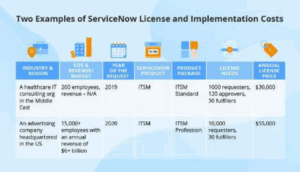
Let’s say you’re IT team uses the ITSM module (IT Service Management). Your help desk staff will need Fulfiller licenses because they’re resolving tickets. But your regular employees only need Requester licenses, which don’t cost extra.
Now suppose you enable Discovery to scan your organization’s network. You’ll be charged based on the number of devices the tool finds. If you don’t need to scan every printer or switch, filter it down and save money.
Or maybe you deploy Virtual Agent to help employees reset passwords. You’ll be billed for how many chat sessions happen—so if usage jumps, your costs might too.
These are the kinds of things you’ll want to monitor and plan for.
IN A NUTSHELL: BE PROACTIVE, NOT REACTIVE
ServiceNow licensing can feel overwhelming, but it’s really about being proactive. Make sure people have the right access levels, track how you’re using the platform, and clean up licenses that aren’t needed.
By doing that, you’ll not only avoid overspending—you’ll also make sure your team gets the most out of what ServiceNow has to offer.





No comment